|

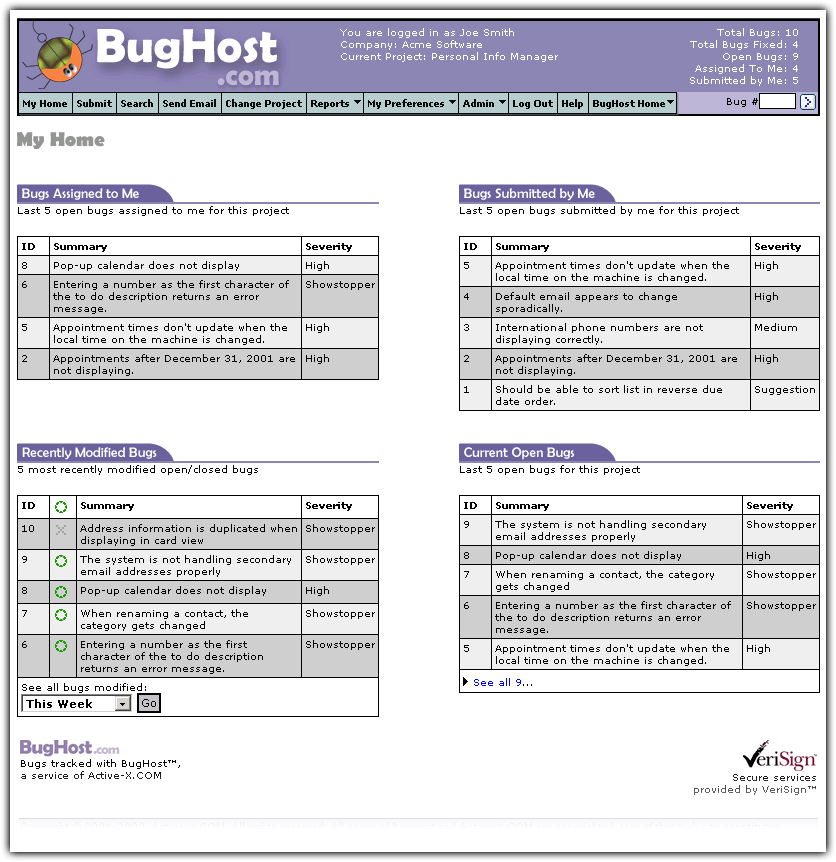
After a successful login, the user is greeted with a home page that has information relating to the default project.
Users can get an instant idea of what to work on based on the mini reports available on the Home Page.
The screen is laid out for easy reference to bugs that have been submitted to the user, bugs submitted by the user,
bugs which have been modified recently, and the most recent open bugs. The page also shows the current
user, current project and some statistical information in the upper-right-hand corner.
My Home Page. Click image to enlarge.
|
Users can click on any of the tab headings to open a standard report instantly. Or, a user can click
on a bug number or summary to open the bug for viewing or editing.
|
|