|

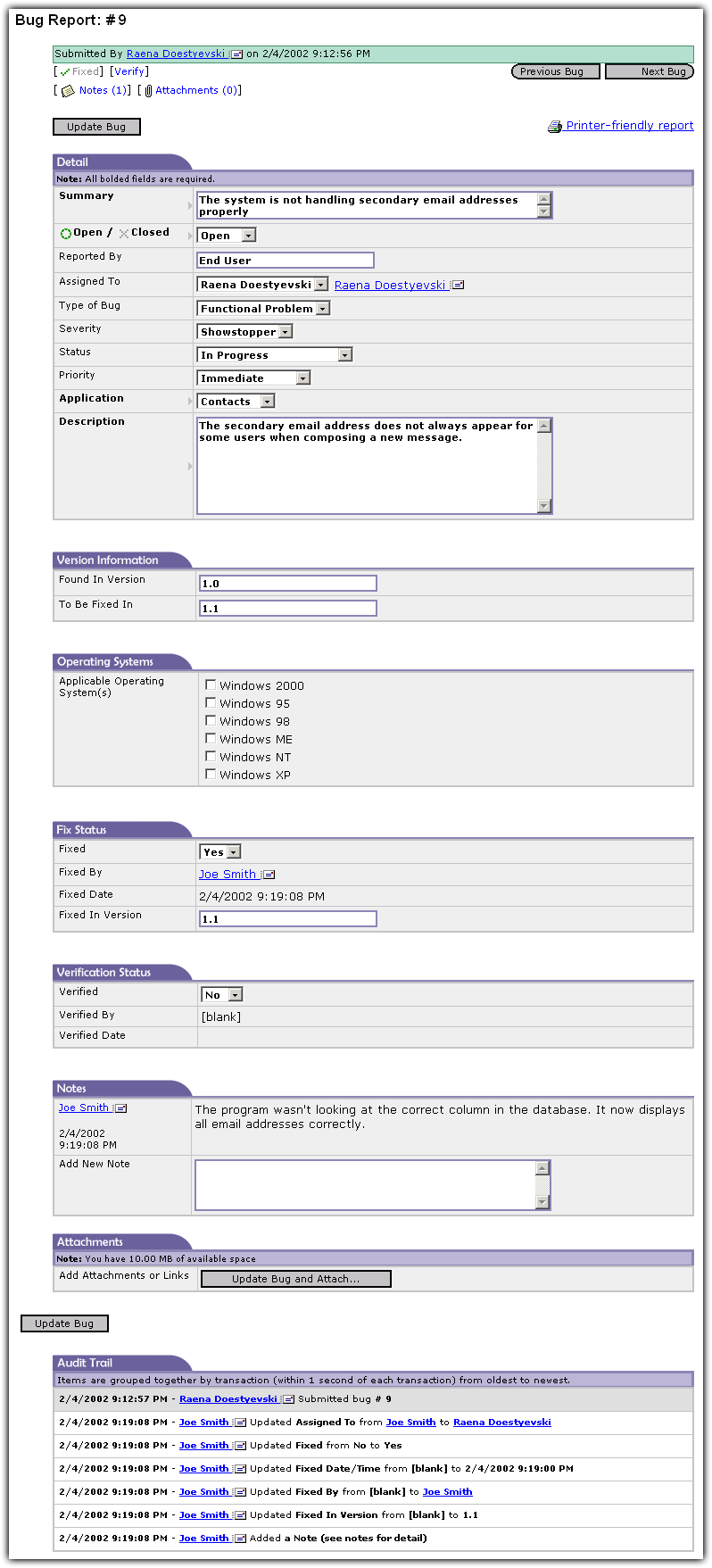
Depending on your security rights, you can view the details of a bug report. Items which users do not have access to will not be displayed. If a user has editing rights, he or she may fill in or change the information.
Links at the top allow you to quickly jump to the area of the bug report you wish to see or edit. You can jump to Fix, Verify, Notes, and Attachments, if you have ample security to do so. There are also links to browse to the previous or next bug.
Edit Bug Screen. Click image to enlarge.
|
Administrators have full control over which fields are required before updating. Administrators can also set who can see the Audit Trail at the bottom of the page. The Audit Trail allows you to see exactly what was changed, when it was changed, and by whom.
This page is designed to allow developers to quickly mark a bug as fixed or a tester to mark it as verified. You will also be able to see all notes associated with the bug report on the same page so you can print the bug report with all parts intact.
Each name in the system has an email link next to it so that you can quickly send a message to that user. You can optionally attach the bug report for a handy reference! (see sample email message)
|
|